E-mail Configuration
To be able to send receipts to customers via e-mail from CPMobile, you must define a valid SMTP host name for your e-mail system or provider, along with other e-mail settings, using the Radiant Management Console.
Follow these steps to configure SMTP settings for your company:
-
Start the Radiant Management Console (Start > Programs > Counterpoint > Utilities > Management Console), select your server from the Object Explorer, and then click the
 Mail tab.
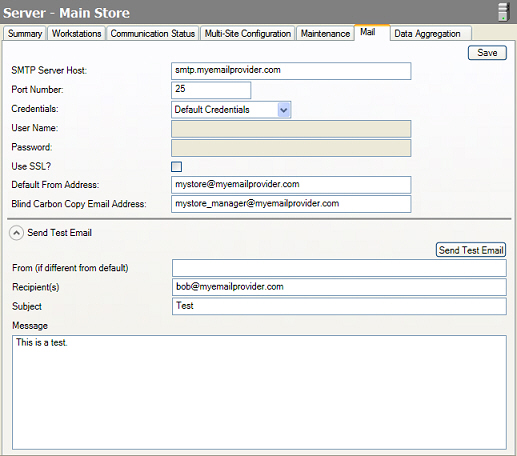
 If you are using Counterpoint in a Multi-Site environment, select your Hub server from the Object Explorer.
-
Enter the SMTP host name for your e-mail system or provider (e.g., smtp.myemailprovider.com) in the SMTP Server Host field.
-
Specify the SMTP port you are using in the Port Number field.
The default SMTP port is 25.
-
If you are required to log in to your e-mail server, select one of the following options from the Credentials list box:
-
Default Credentials - With this option, CPMobile will log in to your e-mail server with the current user's user name and password when the user attempts to send a receipt via e-mail.
-
User Credentials - This option allows you to specify the User Name and Password that CPMobile will use to log in to your e-mail sever when a user attempts to send a receipt via e-mail.
-
If your e-mail system uses the Secure Sockets Layer protocol, select the Use SSL? check box.
-
Enter the Default From Address (e.g., mycompany@myemailprovider.com) for your company.
-
If you want to blind carbon copy receipts to one or more recipients, enter the appropriate e-mail addresses in the Blind Carbon Copy Email Address field, separated by commas.
-
Click the Save button to save your SMTP host name and other e-mail settings.
If you wish, you may send a test message to verify that your e-mail settings are correct.
To do so, expand the Send Test Email section of the Mail tab, specify the recipient for the message, enter a Subject and Message, and then click the Send Test Email button.
If the test message is unsuccessful, double-check your SMTP host name and other e-mail settings, and then send another test message.